
Type AFDIM at the command line
AFDIM
AFDIM (Automatic Feature-based DIMensioning) reads the outline and the holes of a part in AutoCAD®. It recognises the features — holes, slots, notches, fillets, chamfers, hole patterns and bend lines — and places the dimensions, callouts and centrelines for you. It works on the drawing that is already open and never modifies your geometry.
- Select the part, type AFDIM, press Enter
- Native dimensions, leaders and centrelines of your CAD application
- Callouts in the style of ISO 129-1, ASME Y14.5 or JIS B 0001
Paidfrom US$19 / 3 monthsPrices in USD, excluding tax: the tax of your country is added at checkout by Paddle.
DownloadPricingDocumentation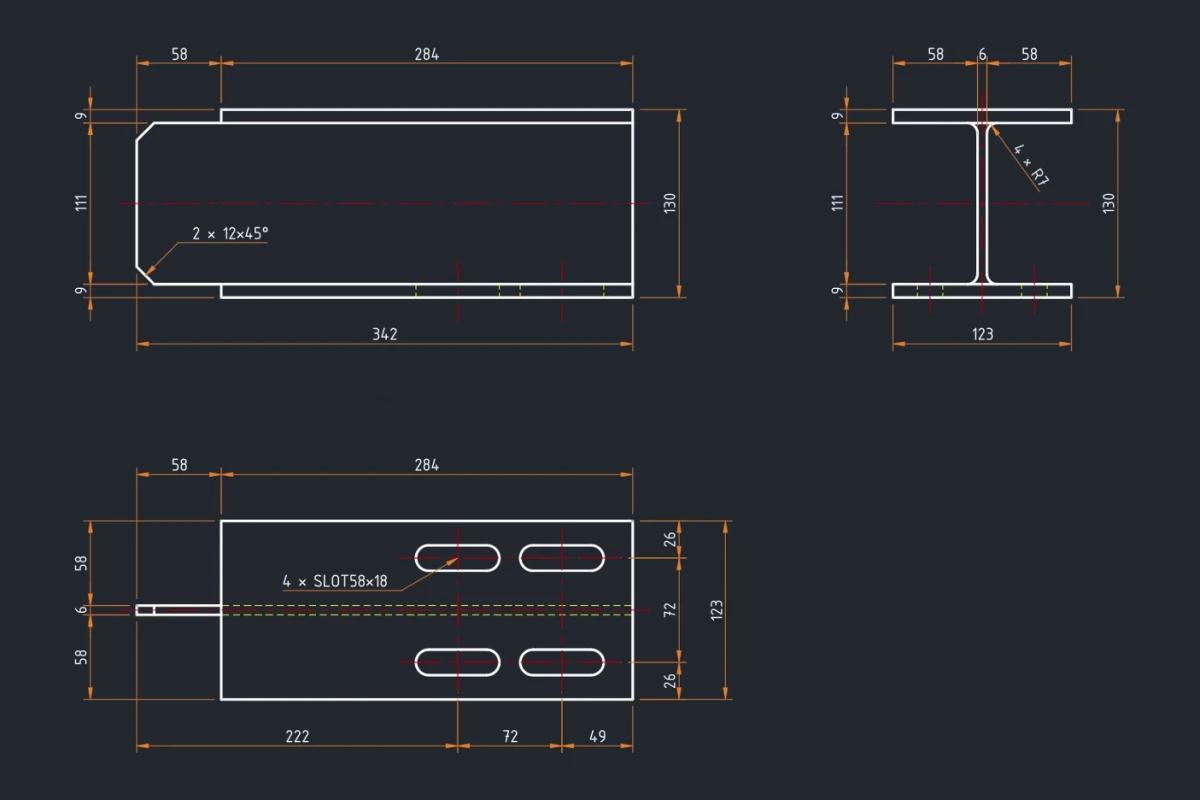
- Runs in
- AutoCAD® 2013–2027AutoCAD® Mechanical 2013–2027ZWCAD 2026GstarCAD 2026BricsCAD V26
- AutoCAD LT
- Not supported — LT has no .NET API
- Operating system
- Windows 10 or 11, 64-bit
- Licence
- One computer per licence · 7-day free trial
What it does
Inside AFDIM
Feature recognition, not edge by edge
AFDIM builds the topology of the outline and recognises what is in it: circular and elliptical holes, slots, notches and protrusions, fillets, chamfers, bolt-hole patterns, rotational patterns and congruent cut-outs. It dimensions each feature the way a drafter would.
Chain dimensions laid out to be read
AFDIM states the overall size first, then the chain dimensions and the position of each feature. It spaces the rows of dimensions from the text height of your dimension style, so the first result reads as a drawing, not as overlapping text.
Bend lines and centrelines
AFDIM keeps dashed lines and centrelines out of the outline and uses them for what they are. It recognises and dimensions bend lines, and draws centrelines on a layer with a broken linetype, so that they do not look like part geometry.
Callouts in your drafting standard
Hole, slot, fillet and chamfer callouts follow a drafting standard: ISO 129-1:2004, ISO 129-1:2018, ASME Y14.5 or JIS B 0001. You can also save your own drafting standard in the settings dialog.
Your drawing stays yours
AFDIM explodes blocks, regions and old-style polylines in memory only. It never modifies the source geometry. Dimensions go on the layer that you choose, and the result line on the command line names the layer that AFDIM used.
Updates and support inside AFDIM
An orange dot on the Settings button tells you that a new version is available. Update now installs it from a signed feed while AutoCAD stays open. Create support zip makes a zip file with no drawing content, and asks first in a window that lists exactly what goes in.
The work it removes
The geometry of a part is already correct when it reaches the drawing. What is left is the slowest part of the job: dozens of DIMLINEAR picks for the outline, a callout for every hole and slot, centre marks, and then moving half of them because they overlap. After the next revision, you have to do most of it again.
AFDIM does that pass for you. You select the part, run one command, and the part comes back dimensioned.
How it behaves in practice
AFDIM reads the selected curves and builds a topological model of the part. The model shows which curves close into the outline, which close into holes and cut-outs, and how they meet. On that model, AFDIM recognises the features. A slot is found as a slot, not as two arcs and two lines. Then AFDIM plans the dimensions as a drafter would: overall width and height, chain dimensions along the outline, the position of each feature, and grouped callouts for repeated holes.
AFDIM plans the placement before it writes anything. It spaces the rows of dimensions from the text height of the current dimension style, and it moves text that would collide. What AFDIM writes is a set of ordinary CAD dimensions, leaders and centrelines. Your office standard (arrowheads, unit format, precision) is still decided by the dimension style.
Treat the result as a first pass. On a dense part, you will move a few dimensions and delete a few. That is less work than dimensioning from nothing.
What it deliberately does not do
AFDIM does not modify your geometry. It does not move, trim, join or erase anything, and it explodes blocks in memory only. It does not redefine dimension styles or text styles. It creates a layer only when the layer that you chose for dimensions or centrelines does not exist in the drawing yet. When AFDIM creates a layer, it tells you.
AFDIM does not upload the drawing, and it does not need an internet connection to work on a file. It is also not a checker. AFDIM places dimensions. You decide whether the drawing is complete and can be manufactured.
Questions
AFDIM questions
Which CAD applications and releases does AFDIM run in?
AutoCAD® and AutoCAD® Mechanical 2013 to 2027, 64-bit, on Windows 10 or 11. Some of these releases are still experimental, and the install page lists them. Not supported: AutoCAD 2007 to 2012, 32-bit AutoCAD, and AutoCAD LT. AutoCAD LT has no .NET API, so no plugin can load there, AFDIM included. ZWCAD 2026, GstarCAD 2026 and BricsCAD V26 are supported too, 64-bit; ZWCAD Standard and BricsCAD Lite cannot load .NET plug-ins, so AFDIM does not run there. One licence covers AFDIM in every CAD application it supports.
What kind of drawings does it read?
Any part: plate and sheet metal, structural sections, machined parts, cut profiles. AFDIM dimensions the outline and the holes and cut-outs inside it. A part with outlines nested several levels deep is only partly understood, so check it for missing dimensions. The outline can be lines, arcs, circles, ellipses, polylines and splines on the XY plane, also inside blocks and regions. Only curves with a continuous linetype form the part outline. AFDIM works on drawings in millimetres or inches. It reads the unit from the drawing, and you can set it under Settings › General › Dimensioning › Drawing units. Inch number formats (decimal, fractional, feet and inches) follow the DIMSTYLE.
Is my drawing sent anywhere?
No. AFDIM works on the drawing that is open in your CAD application and uploads nothing. Activating a licence and checking for updates send no drawing content.
How does the trial work?
The trial is a normal licence for 7 days on one computer, with every feature. To start it, click Start 7-day trial in AFDIM: in Settings › About, or in the window that opens when you run AFDIM without a licence. The computer needs an internet connection, and the trial starts at once. Without a connection, create a request code with Request licence and send it from the Licence page. The licence file then comes by email within 3 business days.
Try AFDIM on a drawing you know
The trial runs for 7 days with every feature. Anything this page does not answer goes to support@afdim.com, and the reply comes from the person who wrote the software.